Turn the videos you record into skills you keep.
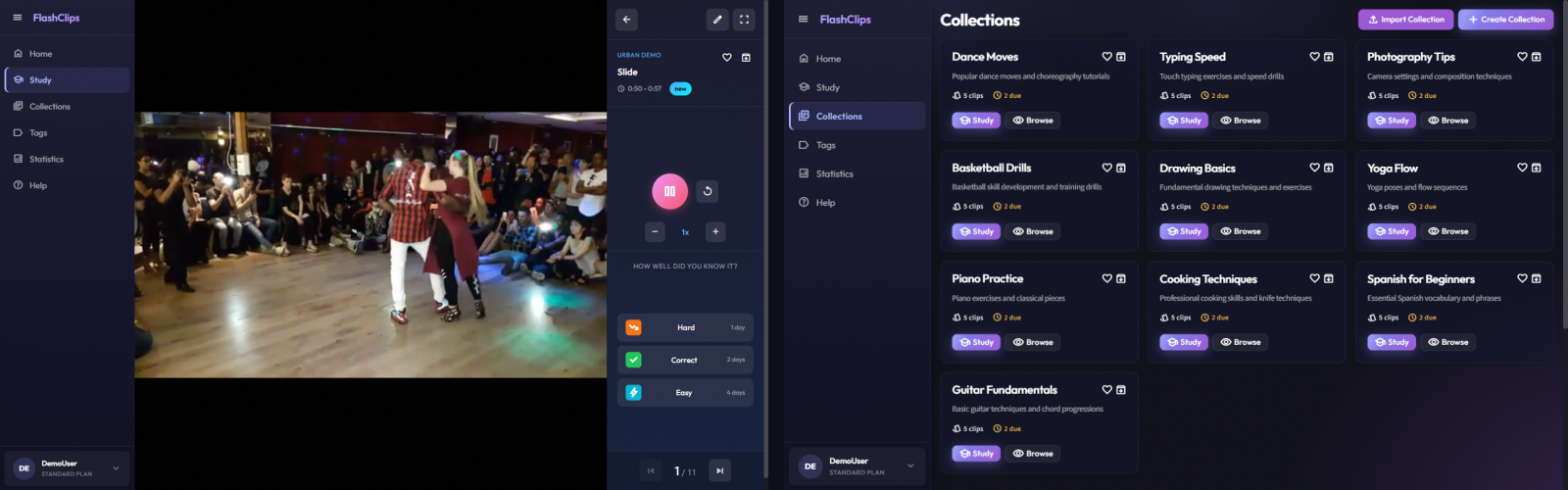
FlashClips turns your recordings from dance festivals, workshops, and training sessions into a study system — so you actually improve, not just collect footage. Works for any skill you learn from video.
Who is it for?
Dancers & Athletes
Record at festivals and workshops. FlashClips schedules your reviews so you actually practice what you learned — before the next class.
Musicians
Guitar lessons, improv sessions, masterclasses. Break it into clips and drill the hard parts until they're in your fingers.
Language Learners
Clip moments from YouTube or TikTok and review them with spaced repetition until the words actually stick.
Any Skill Learner
Yoga, cooking, coding tutorials — if you learn from video, FlashClips is your system.
How it works
Add your video
Paste a YouTube, TikTok, Facebook, Streamable, or Gumlet link and you're ready to go.
Clip the moment
Select the exact start and end time of the move, phrase, or technique you want to remember.
It becomes a flashcard
FlashClips saves it to your collection with tags and notes. Organized, searchable, ready to review.
Review on schedule
Spaced repetition tells you exactly when to watch it again — 1, 2, 4, 7, 14, 30, 60, 90 days — for maximum retention.
Everything you need to actually learn
Finally, a system for your recordings
Stop losing videos in your camera roll. Organize clips by skill, tag by technique, review by schedule.
Remember what you practice
Spaced repetition is the science of memory. FlashClips schedules reviews at exactly the right moment — before you forget.
Works with your favourite platforms
YouTube, TikTok, Facebook, Streamable, Gumlet. FlashClips saves the link and timestamps — videos stay on their original platform, no downloading needed.
Study anywhere
Install it like a native app — straight from your browser. No App Store required.
Share with your crew
Share decks with dance partners, students, or training groups. Everyone reviews the same clips on their own schedule.
Why FlashClips
Not like YouTube
YouTube shows what the algorithm wants. FlashClips brings back the exact clip the moment you start forgetting it.
Video, not typing
No rewriting, no note-taking. You mark the moment — and that's the flashcard.
Big screen, phone in hand
Review on the TV, control from your phone. Scan a QR code and watch every move like you're back at the workshop.
Simple, transparent pricing
Start free. Upgrade when you're ready.
- ✓ 1 collection, up to 20 clips
- ✓ Spaced repetition
- ✓ Study shared collections
- ✓ All video platforms
- ✓ Unlimited collections & clips
- ✓ Unlimited tags
- ✓ Share collections with others
- ✓ Upload your own videos
- ✓ Everything in Free
Cancel anytime · Your data is yours · GDPR compliant
Frequently asked questions
Your next lesson is tomorrow.
Start reviewing today.
Create my first clip — free
No credit card required · Cancel anytime